> ## Documentation Index
> Fetch the complete documentation index at: https://docs.dubot.ai/llms.txt
> Use this file to discover all available pages before exploring further.
# Create and publish a capability
> Compose reusable context and Skill actions for an active agent
A capability is a reusable bundle of context. Attach it to a wizard or the Resource Center
Agent to compose an experience from shared behavior.
## Create the capability
Set a name, then choose one type. Dubot derives the immutable slug when you create the capability.
| Type | Use it for |
| -------------- | ----------------------------------------------------- |
| Security | Security guidance |
| Brand voice | Voice and communication guidance |
| Product domain | Product knowledge and, when needed, a knowledge scope |
| Skill | Reusable guidance plus actions |
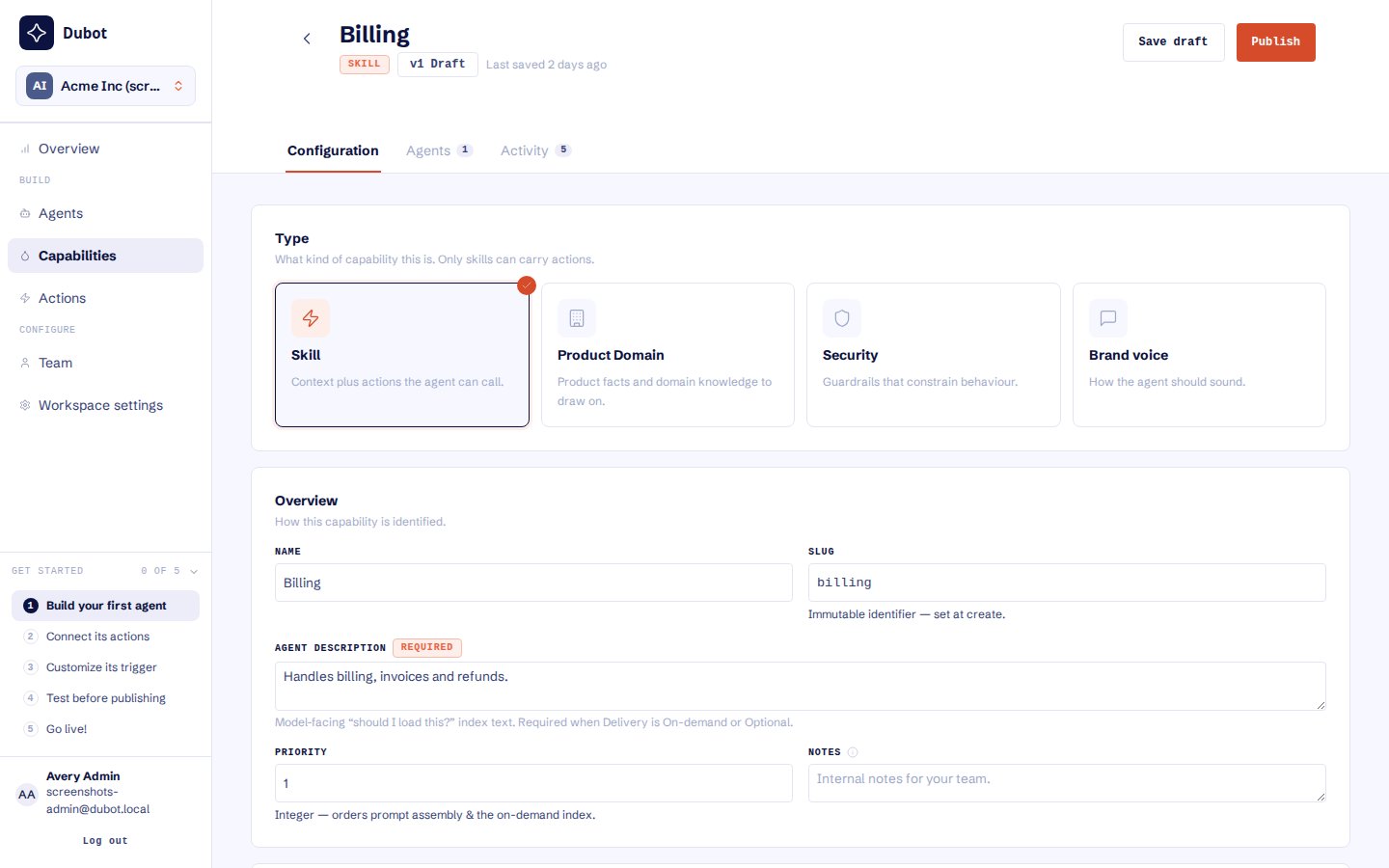 Add the agent prompt, model-facing description, and priority. Choose delivery for the capability:
| Delivery | Meaning |
| --------- | ------------------------------------------------------------------- |
| Always | Include it in agent context by default |
| On-demand | Let the model load it when relevant |
| Optional | Let the agent attachment choose embedded or load-on-demand delivery |
## Add knowledge or actions
Product domain capabilities may define a knowledge scope to limit the product knowledge available
to that capability. Only Skill capabilities can include Session API actions and client-side callbacks.
An action's catalog presence or published state alone does not make it available to a wizard or the
Resource Center Agent.
Before publishing a Skill, review every included action in the dependency list. Hold back any
draft or unsafe dependency rather than publishing it accidentally with the capability.
Add the agent prompt, model-facing description, and priority. Choose delivery for the capability:
| Delivery | Meaning |
| --------- | ------------------------------------------------------------------- |
| Always | Include it in agent context by default |
| On-demand | Let the model load it when relevant |
| Optional | Let the agent attachment choose embedded or load-on-demand delivery |
## Add knowledge or actions
Product domain capabilities may define a knowledge scope to limit the product knowledge available
to that capability. Only Skill capabilities can include Session API actions and client-side callbacks.
An action's catalog presence or published state alone does not make it available to a wizard or the
Resource Center Agent.
Before publishing a Skill, review every included action in the dependency list. Hold back any
draft or unsafe dependency rather than publishing it accidentally with the capability.
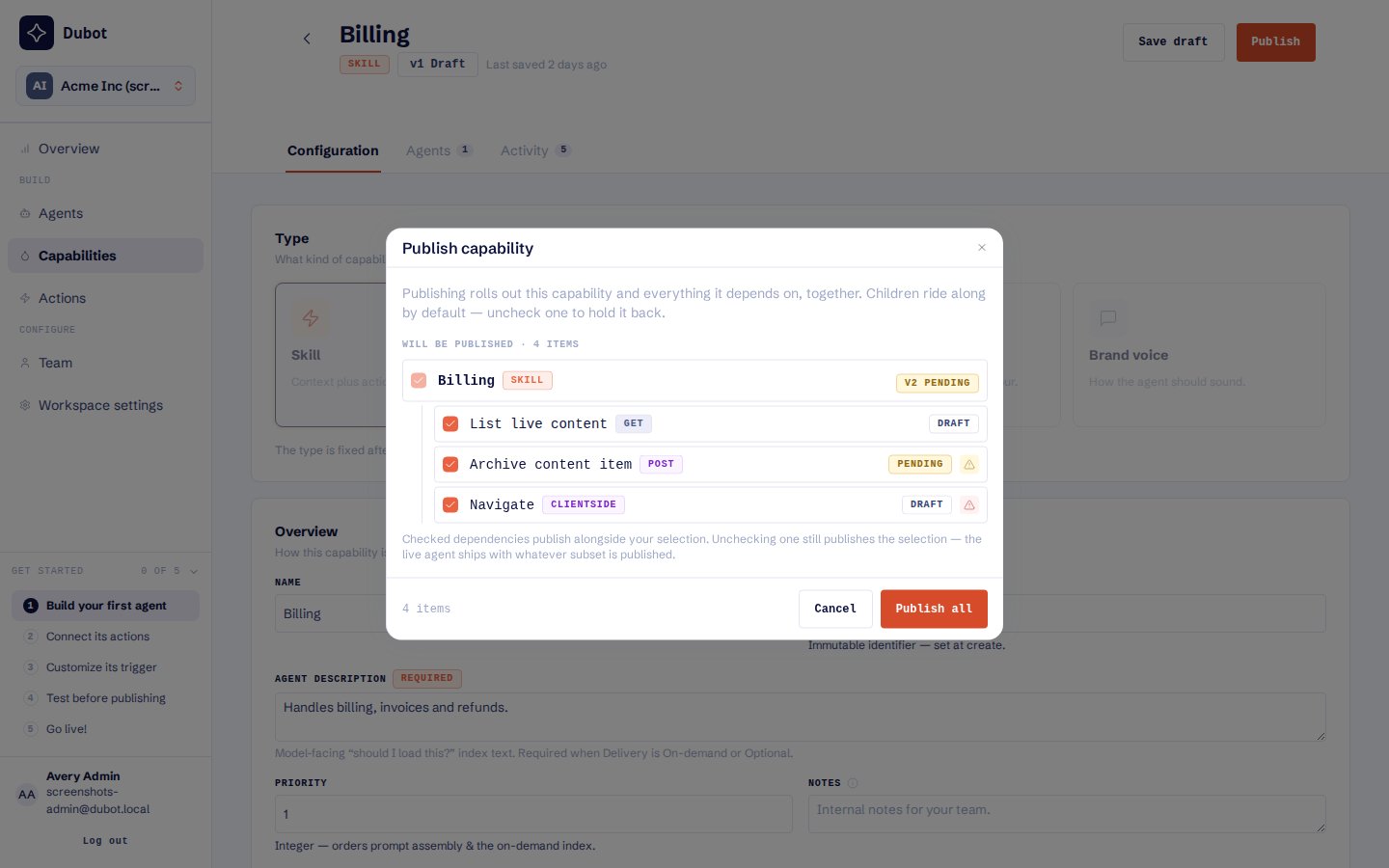 ## Publish and attach
Review its type, delivery, prompt, description, priority, and included content.
Publish the version that should be eligible for runtime use.
Select the published capability on a wizard or the Resource Center Agent.
Publish the Wizard, or publish the Resource Center that contains its reserved Agent configuration.
For an optional capability, the attachment can decide whether to embed it or make it load-on-demand.
For Always and On-demand capabilities, the attachment does not override the capability's own
delivery mode.
Draft or unpublished capability versions and unpublished included actions are omitted from the
Production runtime. A Skill must be published and attached to the active agent for its actions
to be offered.
## Expected result
The active Wizard or Resource Center Agent receives the intended reusable instructions, knowledge,
and published actions without gaining unrelated access. Activity from an included action can be
traced back to the capability that carried it.
Next, attach the capability while [building a Wizard](/guides/build-and-publish-wizard) or
[configuring the Resource Center](/guides/configure-resource-center). See
[Capabilities and actions](/product/capabilities-actions) for the composition model and
[Recover or roll back configuration](/operate/recovery) for dependency repair.
## Publish and attach
Review its type, delivery, prompt, description, priority, and included content.
Publish the version that should be eligible for runtime use.
Select the published capability on a wizard or the Resource Center Agent.
Publish the Wizard, or publish the Resource Center that contains its reserved Agent configuration.
For an optional capability, the attachment can decide whether to embed it or make it load-on-demand.
For Always and On-demand capabilities, the attachment does not override the capability's own
delivery mode.
Draft or unpublished capability versions and unpublished included actions are omitted from the
Production runtime. A Skill must be published and attached to the active agent for its actions
to be offered.
## Expected result
The active Wizard or Resource Center Agent receives the intended reusable instructions, knowledge,
and published actions without gaining unrelated access. Activity from an included action can be
traced back to the capability that carried it.
Next, attach the capability while [building a Wizard](/guides/build-and-publish-wizard) or
[configuring the Resource Center](/guides/configure-resource-center). See
[Capabilities and actions](/product/capabilities-actions) for the composition model and
[Recover or roll back configuration](/operate/recovery) for dependency repair.