> ## Documentation Index
> Fetch the complete documentation index at: https://docs.dubot.ai/llms.txt
> Use this file to discover all available pages before exploring further.
# Guidance
> Help a customer complete work in the product interface
Guidance operates against the live page with visible controls for the customer. It is useful when
the task is easier to complete in context than through conversation alone.
The marketing site uses [**Browserbot**](https://www.dubot.ai/browserbot) for the broader
live-product experience. In the Dubot app, SDK, and technical docs, its guided on-page runtime is
configured under **Guidance**. Governed API operations are documented separately as
[Actions](/product/capabilities-actions).
## What the customer sees
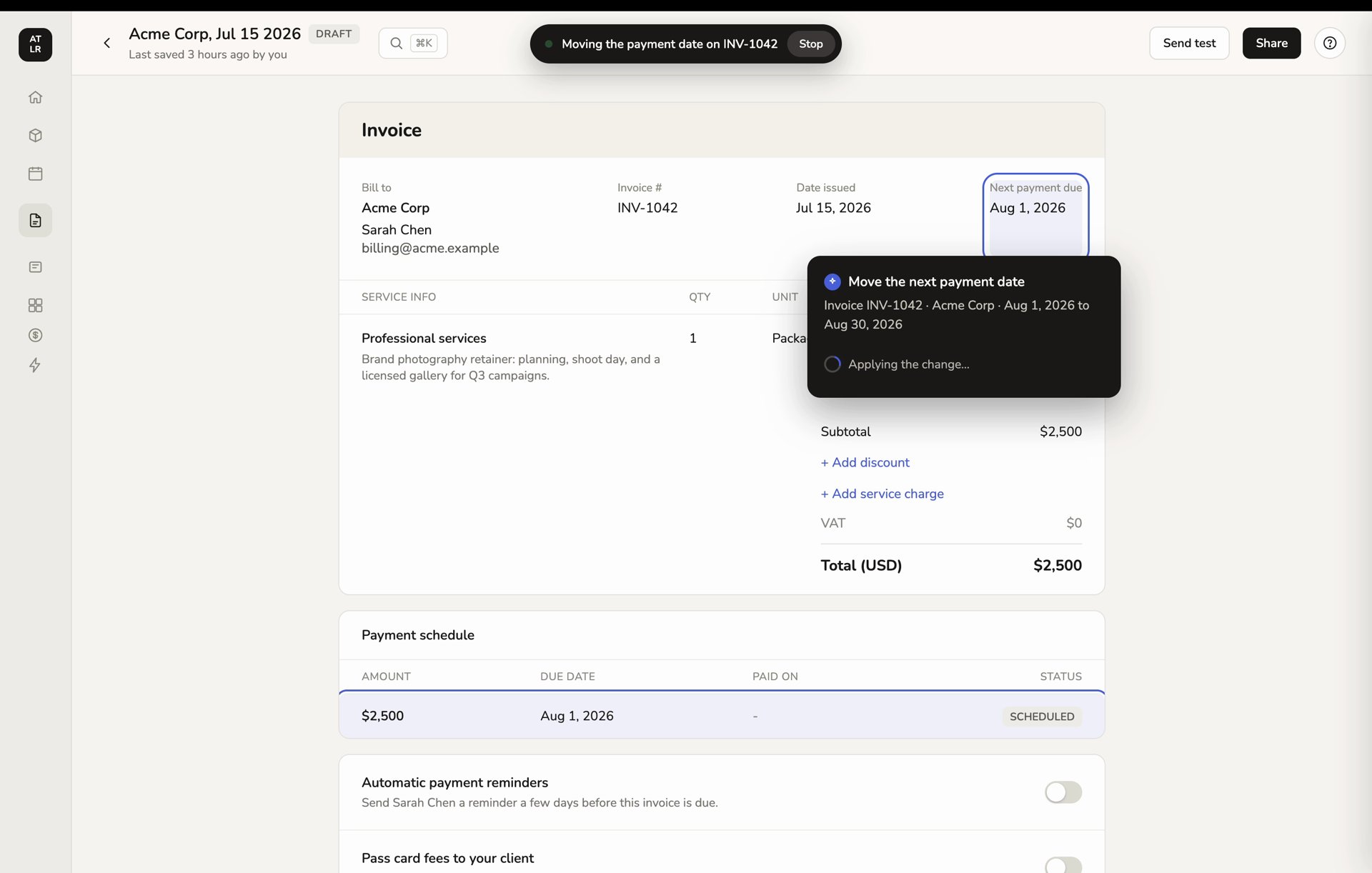
An active run keeps its job and **Stop** control visible while it works on the page. The action
card stays anchored to the target so the customer can see what is happening.
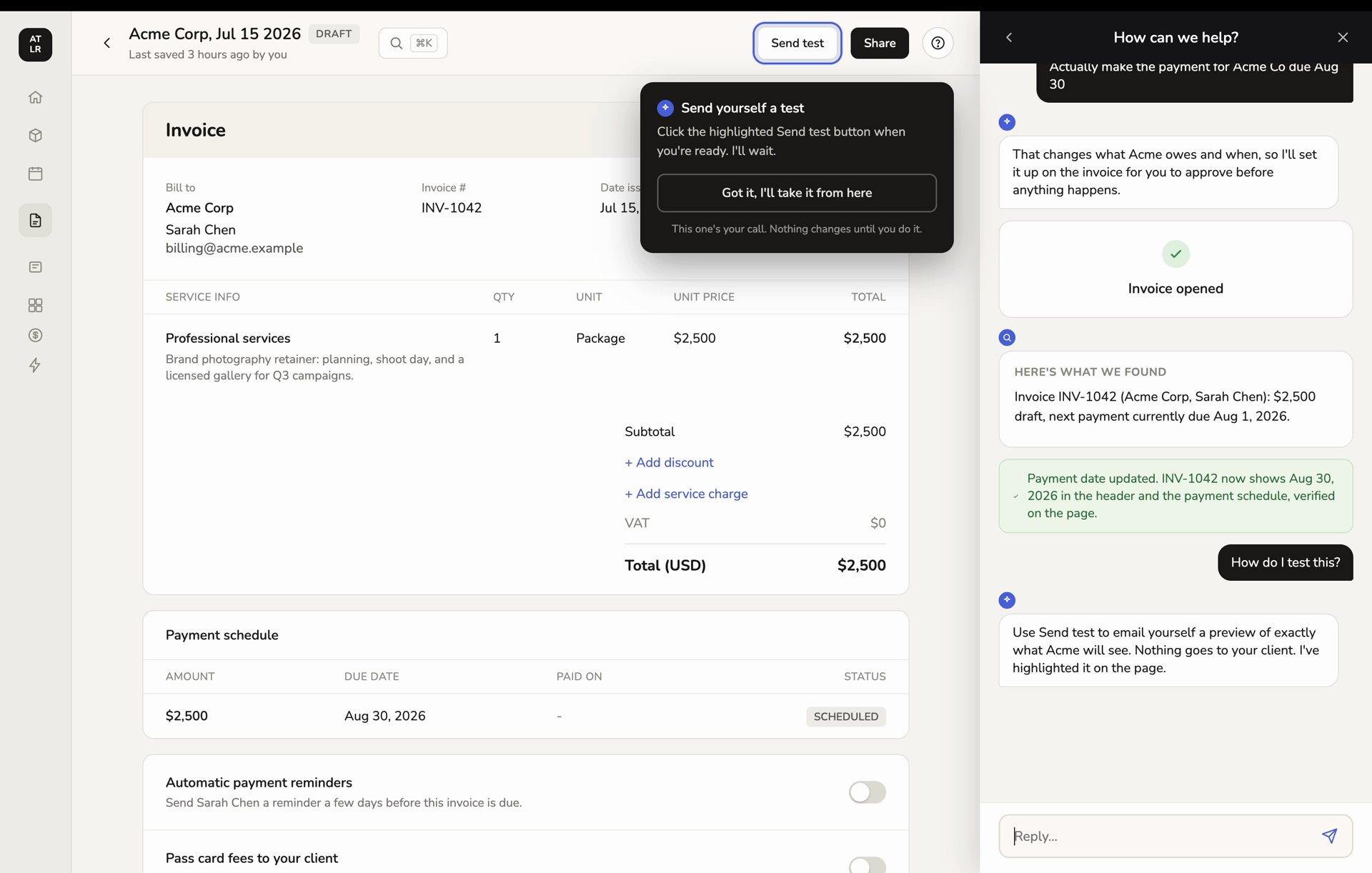
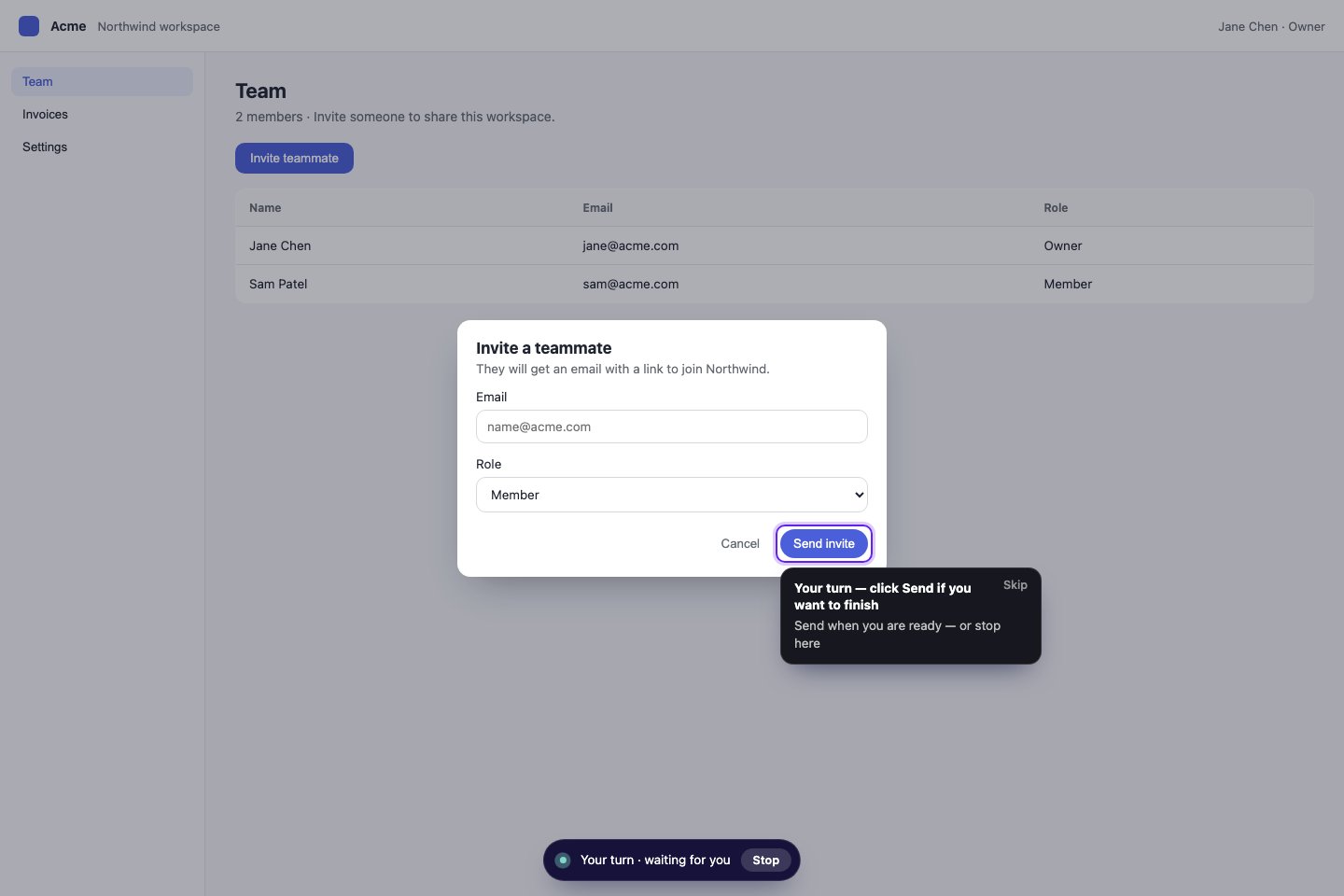
 When a step belongs to the customer, Guidance highlights the target and waits instead of taking
over. The customer can complete the step or choose the offered handoff.
When a step belongs to the customer, Guidance highlights the target and waits instead of taking
over. The customer can complete the step or choose the offered handoff.
 The HoneyBook workspace shown in these examples is a demo account. The exact host-product
styling can vary, but the visible run, target, and stop controls are the important behavior.
## Two ways to start
| Mode | Input | Use when |
| ------------------- | -------------------- | ------------------------------------------------------------------------- |
| Reviewed guide | A published guide id | The journey and its expected steps have been authored and reviewed |
| Goal-based Guidance | A free-text goal | A controlled evaluation needs the runtime to reason over the current page |
Reviewed guides are the more predictable customer-facing path. Goal-based Guidance should be
evaluated with clear constraints and a safe stopping condition before broader use.
## Reviewed guide steps
| Step | What it does |
| -------- | --------------------------------------------------------------------------- |
| Message | Explains context without acting |
| Perform | Executes a reviewed interaction such as a click |
| Indicate | Highlights a target and waits for the customer, a Next action, or a timeout |
| Ask | Pauses for a choice or free-text response |
**Indicate is currently Test-only.** You can author, save, and test an Indicate step, but the
current product will not publish a guide that contains one. This is a platform compatibility
gate, not something an individual workspace can unlock by upgrading its SDK. Keep the guide as
a draft until Production supports the richer guide format. Do not change Indicate to Perform
merely to bypass the gate because Perform would take the customer-owned action.
The HoneyBook workspace shown in these examples is a demo account. The exact host-product
styling can vary, but the visible run, target, and stop controls are the important behavior.
## Two ways to start
| Mode | Input | Use when |
| ------------------- | -------------------- | ------------------------------------------------------------------------- |
| Reviewed guide | A published guide id | The journey and its expected steps have been authored and reviewed |
| Goal-based Guidance | A free-text goal | A controlled evaluation needs the runtime to reason over the current page |
Reviewed guides are the more predictable customer-facing path. Goal-based Guidance should be
evaluated with clear constraints and a safe stopping condition before broader use.
## Reviewed guide steps
| Step | What it does |
| -------- | --------------------------------------------------------------------------- |
| Message | Explains context without acting |
| Perform | Executes a reviewed interaction such as a click |
| Indicate | Highlights a target and waits for the customer, a Next action, or a timeout |
| Ask | Pauses for a choice or free-text response |
**Indicate is currently Test-only.** You can author, save, and test an Indicate step, but the
current product will not publish a guide that contains one. This is a platform compatibility
gate, not something an individual workspace can unlock by upgrading its SDK. Keep the guide as
a draft until Production supports the richer guide format. Do not change Indicate to Perform
merely to bypass the gate because Perform would take the customer-owned action.
 The browser extension can help author guides from a real workflow. Captured interactions remain
review material until the guide is saved and, when its step types are Production-compatible,
published.
## Runtime controls
* A persistent control lets the customer stop a run.
* Indicate steps include a visible target, instruction, and Skip option.
* Guidance can pause for customer input rather than guessing.
* A run that crosses a hard navigation can resume after the SDK initializes on the next page.
* Reduced-motion and screen-reader behavior are part of the SDK surface.
* Completion, stop, error, and abandoned outcomes are recorded for activity review.
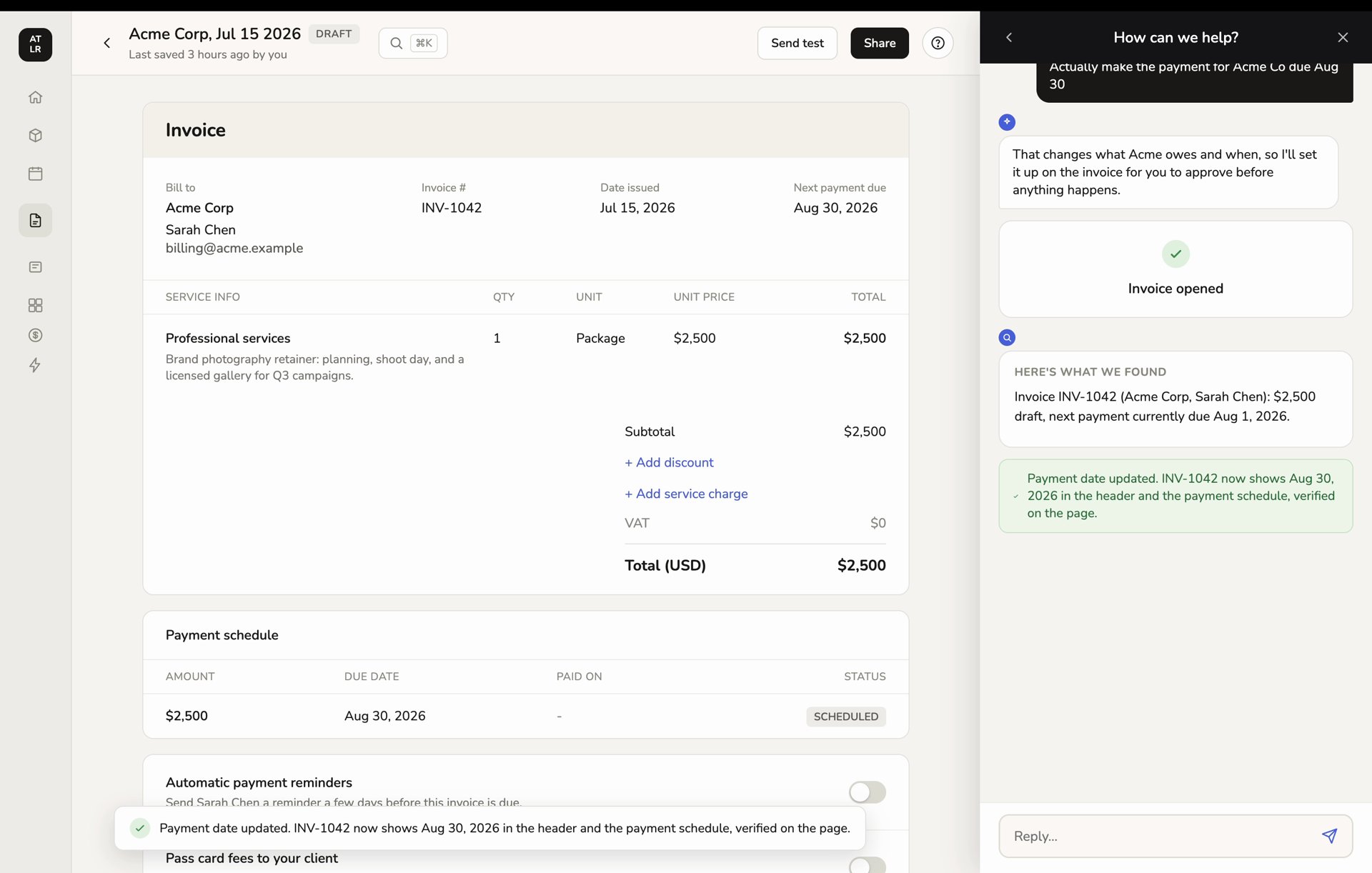
A completed action should show both the changed page state and a bounded result in the panel. In
this demo, the updated date is visible in the invoice and Dubot reports that it verified the value
on the page.
The browser extension can help author guides from a real workflow. Captured interactions remain
review material until the guide is saved and, when its step types are Production-compatible,
published.
## Runtime controls
* A persistent control lets the customer stop a run.
* Indicate steps include a visible target, instruction, and Skip option.
* Guidance can pause for customer input rather than guessing.
* A run that crosses a hard navigation can resume after the SDK initializes on the next page.
* Reduced-motion and screen-reader behavior are part of the SDK surface.
* Completion, stop, error, and abandoned outcomes are recorded for activity review.
A completed action should show both the changed page state and a bounded result in the panel. In
this demo, the updated date is visible in the invoice and Dubot reports that it verified the value
on the page.
 ## Configure and publish
The Guidance area contains the reserved Guidance configuration, reviewed guides, and Activity.
Production can run only published Guidance configuration and published guides. A Resource Center
guide card should not be treated as ready until its guide can be published and its Guidance
dependency works in the target environment. A draft guide containing Indicate steps can be tested,
but it cannot currently become a Production Resource Center destination.
Follow [Enable Guidance](/guides/enable-guidance) to configure the workspace, test a representative
walkthrough, and turn Guidance on. Then follow
[Turn a Guidance run into a guide](/guides/review-guidance-run) to review a real journey and
publish it as reusable help.
Developers can start Guidance through `Dubot.triggerGuidance()`. See
[SDK surfaces](/sdk/surfaces) for the supported call shapes.
## Configure and publish
The Guidance area contains the reserved Guidance configuration, reviewed guides, and Activity.
Production can run only published Guidance configuration and published guides. A Resource Center
guide card should not be treated as ready until its guide can be published and its Guidance
dependency works in the target environment. A draft guide containing Indicate steps can be tested,
but it cannot currently become a Production Resource Center destination.
Follow [Enable Guidance](/guides/enable-guidance) to configure the workspace, test a representative
walkthrough, and turn Guidance on. Then follow
[Turn a Guidance run into a guide](/guides/review-guidance-run) to review a real journey and
publish it as reusable help.
Developers can start Guidance through `Dubot.triggerGuidance()`. See
[SDK surfaces](/sdk/surfaces) for the supported call shapes.