

The Resource Center is implemented in the current product build. Workspace configuration and
deployment determine whether it is available in a target environment.
A first-class, workspace-owned help surface
Each workspace has one versioned Resource Center. It combines a default resource list with optional route overrides for the page the customer is viewing. The Resource Center is authored and published as its own product surface. Its dashboard has four tabs: Content, Agent, Settings, and Analytics. Version history belongs to the Resource Center configuration, and the embedded Ask agent publishes as part of the same version.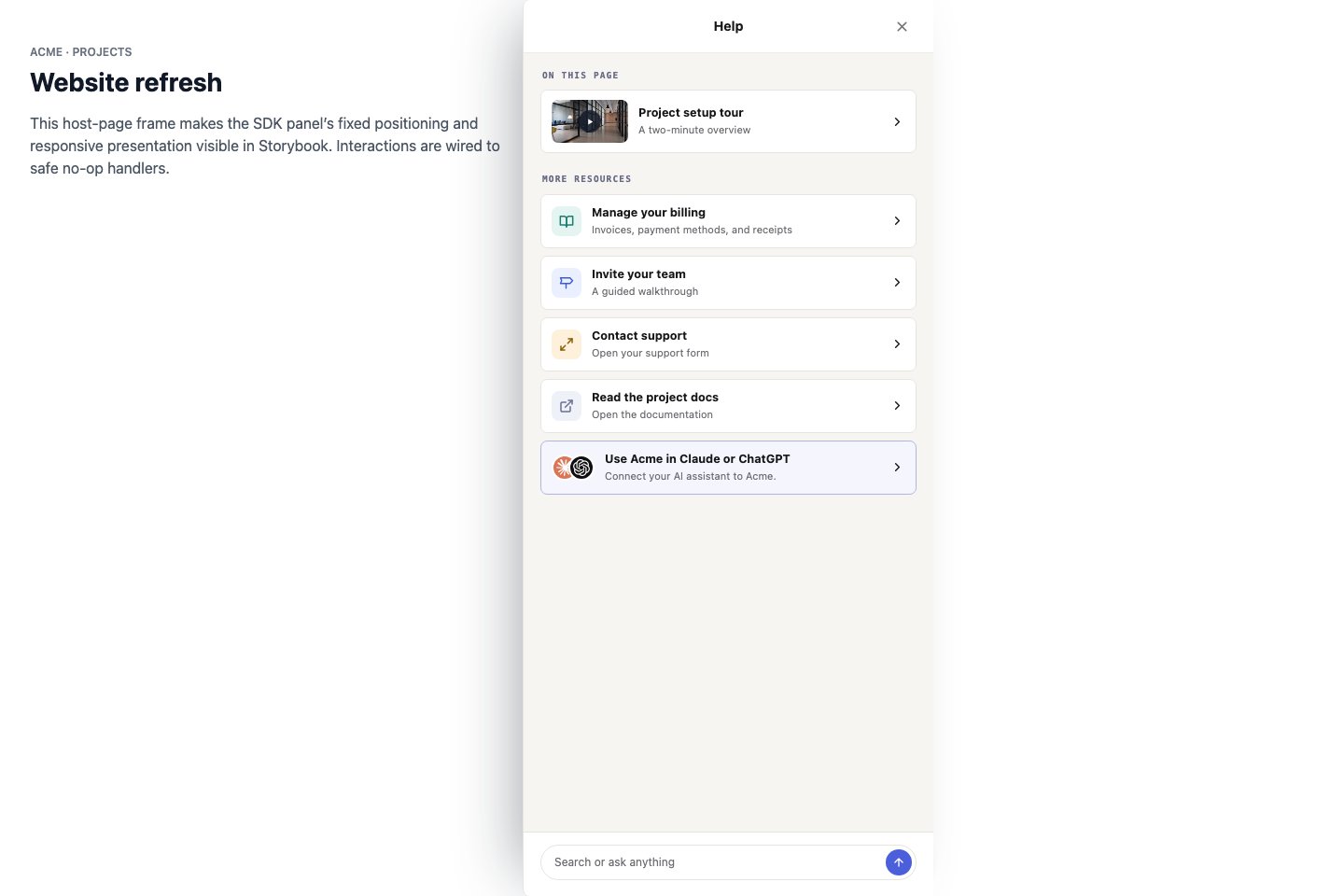
A page-aware Resource Center combines curated content, Search, and Ask in the product interface.
This demonstrates the implemented panel, card, trigger, and composer states.
Content
The default list and route overrides can contain:- published reviewed guides;
- Help Center articles with an external URL;
- video embeds;
- hyperlinks;
- host-provided callback cards;
- an MCP connector card for the controlled-rollout action channel.
Search and Ask
Search and Ask are independent workspace-wide features configured on the Resource Center. When enabled, they remain available below the contextual content list on every eligible page.- Search returns ranked article cards from the delivered workspace knowledge corpus.
- Ask opens an in-panel conversation with the reserved Resource Center Agent.
- Ask receives the current route and resolved Resource Center content automatically at runtime.
- The reserved agent is configured only in the Agent tab. Its prompt, explicit knowledge scope, capabilities, and action references are embedded in the versioned Resource Center; it is not a normal placeable wizard and has no separate publish lifecycle.
- Static cards do not become search results or Ask grounding.
- Articles open at their external source rather than in an in-panel reader.
Settings and triggers
The Settings tab controls display copy, trigger behavior, availability, and which Resource Center callbacks may be exposed. Display settings include the panel title and Search/Ask placeholder. Choose one trigger mode:
When an agent Sidebar is mounted, the Resource Center’s base launcher and browse panel yield to
that sidebar. An active Ask conversation remains open.
Analytics
The Analytics tab reports panel opens and unique viewers, card impressions and clicks with per-item breakdowns, searches and searches with results, and Ask/chat submissions. Search text and question text are not retained in Resource Center analytics.Host callbacks
Callback cards run functions supplied throughDubot.init({ resourceCenterCallbacks: [...] }). They are deliberately separate from
agent-callable actions: selecting a card invokes the matching host handler directly, and the
handler is never advertised as a tool to a wizard or MCP client.